Product Design

20+ years across national and multinational companies, government, publishers and SME / startups. Experienced as a Senior, Principal or a Lead role. Strategic product design and development. Problem-solving & impact-driven.

Case

Detailed
National Library
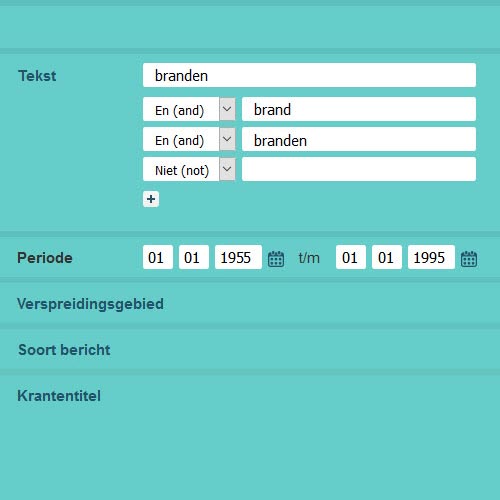
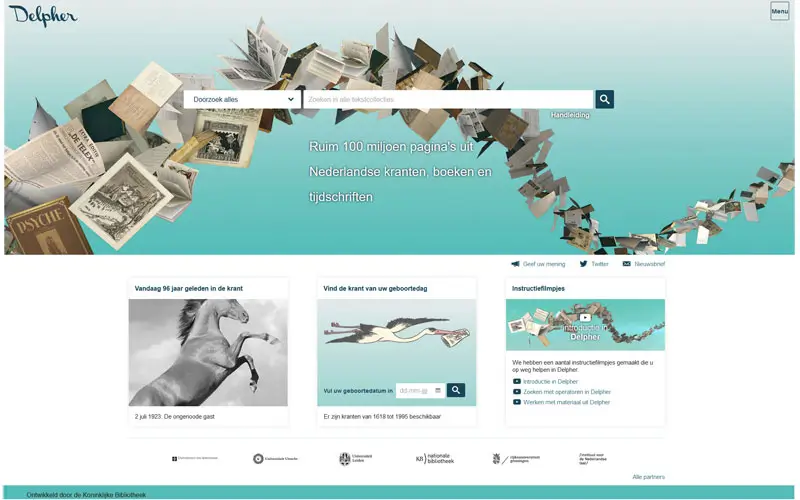
Delpher website
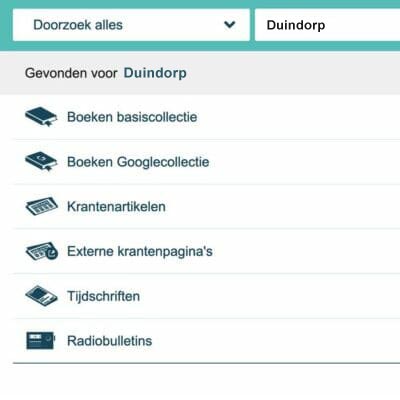
Delpher detail
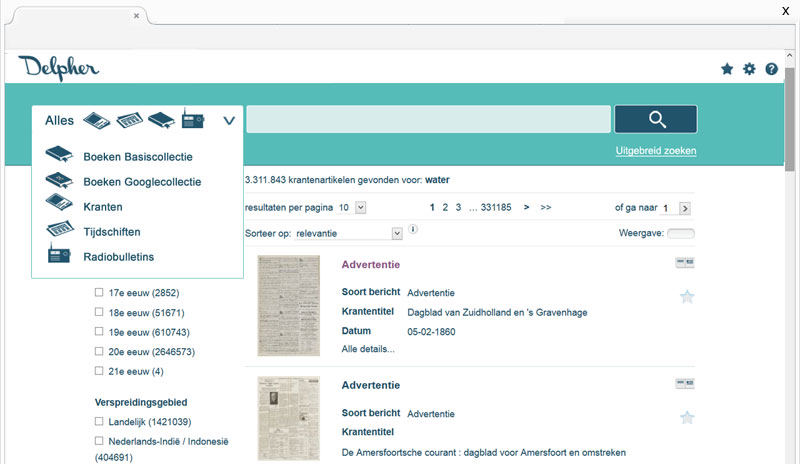
Delpher website detail
KB Nationale Bibliotheek
 
KB Nationale Bibliotheek Search
Case
  • ▪ Industry / Branch
  • Government & Education
  • ▪ Role
  • Senior Product Designer
  • ▪ Services
  • Consulting · Analysis · UX Research · UX Design · UI Design · Prototyping · Engineering · Development · Usability · Optimization · Accessibility Wcag

The Challenge
  • ▪ Client
  • The Dutch Royal Library (KB - Koninklijke Bibliotheek) - the National Library of the Netherlands and custodian of the country's digital heritage.
    Their flagship platform, Delpher, provides access to millions of digitized historical documents, books, newspapers and other media.
  • ▪ Challenge
  • Delpher is an invaluable research tool, and it's very important for Dutch national heritage and treasures. Its Interface and Usability had grown dated and complex.
    The challenge was unique: redesign for clarity and usability while making minimal structural changes.
  • ▪ Demographics
  • The user base spans academic researchers, genealogists, students and casual history enthusiasts - a wide demographic with varying levels of digital literacy. The solution had to be inclusive, accessible and respectful of the platform's established workflows.

Role
  • ▪ Role summary
  • Building on my previous consultancy experience with governmental projects, I was personally invited to lead the redesign initiative.
    As the Senior Product Designer, I was responsible for stakeholder consultation, user analysis, UX research and design, UI development, and front-end re-engineering.
    The comprehensive redesign and refactoring process was successfully completed in late summer 2014, with the support of two Library staff developers focused on backend refactoring.

Research
  • ▪ Initial
  • The discovery phase involved a deep audit of the existing Delpher interface, coupled with stakeholder interviews and a review of existing user feedback.
    Key friction points were identified in the search filtering system, the display of digitized newspaper pages, and the overall mobile experience - which was nearly non-existent.
  • ▪ User
  • User archetypes were mapped, from the power-user academic conducting rigorous research to the amateur genealogist exploring family history. The analysis revealed a common thread:
    - users valued the depth of the content but were frustrated by the friction of the interface.
  • ▪ The goal
    1. Modernize and optimize user journey
    2. Re-design UI to meet contemporary usability and accessibility standards (WCAG).
    3. Introduce a fully responsive, mobile-friendly layout without disrupting the core search experience.
    4. Simplify navigation and content presentation while preserving all critical research functionality.

Target
  • ▪ The struggle
  • The target audience, ranging from university scholars to retired history professors, struggled with a desktop-centric interface that was cluttered and difficult to navigate - especially on phones or tablets.
    The lack of accessibility was a known gap, creating barriers for users with visual impairments who relied on screen readers, and general usability suffered as well.
  • ▪ The expectation
  • Users expected the authority and depth of a National Library with the intuitive ease of modern web applications. They wanted to find historical documents quickly and read them comfortably on any device, without losing the context of their research session.
Persona
  • ▪ The Academic Researcher
    • Role: PhD Candidate, Historian, or Lecturer
    • Goals:
      - Conduct precise and advanced searches efficiently
      - Access reliable citation tools for academic work
      - Lack of mobile devices support
    • Pain Points:
      - User experience is unclear, leading to confusion
      - Interface clutter hampers deep research workflows and slows down productivity
  • ▪ The Curious Explorer
    • Role: Genealogist, Local Historian, Retiree
    • Goals:
      - Discover historical records and stories easily
      - Enjoy a seamless and pleasant reading experience
    • Pain Points:
      - The website feels intimidating and difficult to navigate
      - The site does not function well on their iPad, limiting access and enjoyment

Features
  • ▪ Minimal for maximum
  • The design philosophy was rooted in restraint. Instead of a full structural overhaul, the focus was on visual hierarchy, spacing, typography, and color contrast. By cleaning up the UI and applying a consistent design language, the platform's existing functionality was elevated without requiring users to relearn the system.
  • ▪ Mobile-first
  • A new responsive framework was introduced to ensure the digitized document viewer, search filters, and navigation adapted gracefully to smartphones and tablets - first for the Delpher platform and a major win for accessibility and user satisfaction.
  • ▪ WCAG Compliance
  • Accessibility was a core requirement. The redesign ensured compliance with Dutch government accessibility standards.

Validation
  • ▪ Review
  • In a government context requiring minimal disruption, high-fidelity mockups and interactive prototypes were presented directly to the Delpher team and stakeholders, enabling rapid alignment on visuals and interaction before development began.
  • ▪ Stakeholder alignment
  • Iterative feedback balanced respect for the platform's legacy with critical user needs. The mobile layout underwent several rounds of refinement to keep dense information legible and navigable on smaller screens.

Final
  • ▪ The renewed platform
  • The redesigned Delpher interface is a study in clarity. Visual noise stripped away, replaced by a clean, professional and minimalist aesthetic befitting a national institution.
    Search is now re-designer and intuitive and also responsive. Now, for the first time, centuries-old newspapers are comfortably browsable on all mobile devices.
    The platform remains true to its heritage mission,but now with a modern, inclusive interface.
Design
  • ▪ Visual
  • A neutral, academic color palette with improved contrast ratios. Typography was optimized for long-form reading of digitized historical texts, with careful attention to line height and font sizing across breakpoints.
  • ▪ Integration
  • The design deliverables were structured to integrate smoothly with the Royal Library's existing technical infrastructure, minimizing development overhead and ensuring a swift, low-risk rollout.

Results
  • ▪ Impact
  • The Government & Education platform has been successfully redesigned into a more user-friendly, mobile-responsive experience. The updated interface has significantly increased user satisfaction and engagement, while also improving functionality for a smoother overall research experience.
  • ▪ Key takeaways
    • - Respect the legacy: In government and education contexts, minimal, surgical UI improvements often deliver more value than radical redesigns.
    • - Mobile is an accessibility issue: For older demographics and students alike, mobile responsiveness is a primary driver of engagement.
    • - Trust is built through clarity: A clean, accessible interface reinforces the credibility and authority of a public institution.

Go to Cases


Contact

& get in Touch

aalleexxxxwwoorrkkss..ppaaggeess..ddeevv
aalleexxxxwwoorrkkss@@pprroottoonn..mmee
++3311((00))662200551199557722