Product Design

20+ years across national and multinational companies, government, publishers and SME / startups. Experienced as a Senior, Principal or a Lead role. Strategic product design and development. Problem-solving & impact-driven.

Case

Detailed
RWS
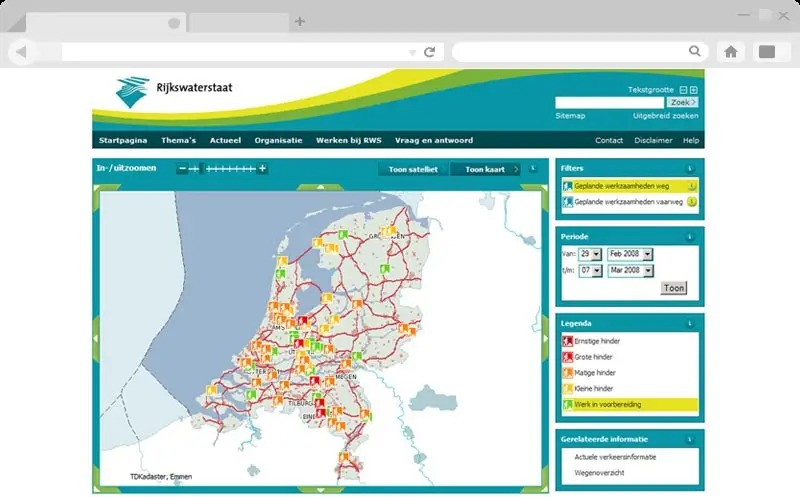
Website RWS
Website RWS
Website RWS latop view

Case
  • ▪ Industry / Branch
  • Government / Geospatial & Water Management
  • ▪ Role
  • Product Designer
  • ▪ Services
  • Consulting · Analysis · UX Design · UI Web Re-design · UX UI Engineering · Prototyping · Mockup · Development · Usability · Optimization · WCAG Accessability

The Challenge
  • ▪ Client & context
  • The Directorate-General for Public Works and Water Management (Rijkswaterstaat) relies on "Geotool" - a Java application providing essential tools for geospatial data analysis. The project brief was to integrate a new Graphical User Interface (GUI) into this existing system.
  • ▪ Challenge
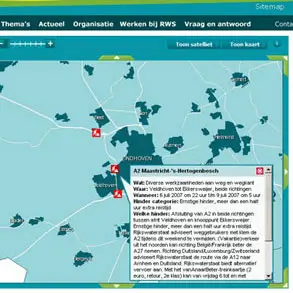
    • During the initial layout integration, significant user interface flaws were uncovered. The Legend was positioned directly over the map, obstructing critical visibility and hindering interaction.
    • The filter menu was excessively long and cluttered with options irrelevant to real-world workflows.
    • Most critically, users were forced to navigate through too many clicks to access essential information, severely reducing operational efficiency for government analysts.

Role
  • ▪ Role summary
    • As the Senior Product Designer, I was responsible for more than just front-end integration. Upon identifying the usability roadblocks, I undertook a thorough review and evaluation of the entire interface.
    • My role expanded to encompass full UX/UI redesign, interactive prototyping, and front-end development to deliver a compliant, efficient, and user-centric solution.

Research
  • ▪ Heuristic evaluation
  • A systematic usability audit was conducted on the proposed layout. Key friction points were mapped: map occlusion by the legend, cognitive overload from an unfiltered menu, and inefficient navigation depth requiring excessive clicks for common geospatial tasks.
  • ▪ Understanding the users
  • The primary users are geospatial analysts and water management specialists within the government. Their workflow demands rapid, unobstructed access to layered map data. Any interface element that obscures the map or slows down data retrieval directly impacts mission-critical decision-making regarding public works and water safety.
  • ▪ The goal
    1. - Redesign the GUI to eliminate map obstruction and improve spatial awareness.
    2. - Streamline navigation and filtering to reflect real-world usage and reduce clicks.
    3. - Ensure the enhanced interface meets strict WCAG accessibility compliance for government software.

Target
  • ▪ The struggle
  • Analysts were fighting the interface. The map core of the application was visually blocked by UI controls. Finding a specific data layer required scrolling through an exhaustive, unsorted list. Each action demanded multiple confirmation clicks, turning a quick data check into a frustrating, time-consuming process.
  • ▪ The expectation
  • Government users expect precision and reliability. They need tools that are transparent, fast, and accessible to all staff, including those relying on assistive technologies. An efficient interface is not a luxury; it is a requirement for maintaining public infrastructure.

Persona
  • ▪ The Geospatial Analyst
    • Role: Government GIS Specialist, Hydrologist, or Infrastructure Planner
    • Goal: Quickly overlay and analyze geospatial data to inform public works decisions.
    • Pain Point: UI clutter and slow navigation that obstruct the map view and waste valuable time.
    • Quote: "I need to see the data, not the buttons."

Features
  • ▪ Spatial-first layout
  • The legend was relocated to a non-intrusive, collapsible panel docked to the side of the map viewport. This restored full visibility of the geospatial data and allowed users to toggle the legend only when needed.
  • ▪ Streamlined navigation
    • - The filter menu was completely restructured.
    • - Redundant and low-use options were removed or grouped logically based on real-world application scenarios.
    • - A search function was introduced, drastically reducing the time required to locate specific layers and cutting the number of clicks to access core information.
  • ▪ WCAG Compliance
    • - Accessibility was embedded from the start of the redesign.
    • - Keyboard navigation, focus management, and screen reader compatibility were rigorously implemented to ensure the tool met government standards and was inclusive for all staff members.

Validation
  • ▪ Interactive mockups
  • High-fidelity interactive prototypes were created to demonstrate the new layout and navigation logic. These prototypes were presented to the Directorate-General for Public Works and Water Management to illustrate the tangible improvements in efficiency and spatial clarity.
  • ▪ Stakeholder approval
  • The proposed changes were reviewed and subsequently approved by the government stakeholders. The clear contrast between the original obstructed layout and the redesigned, user-centric interface was instrumental in securing the green light for integration.

Final
  • ▪ The integrated solution
  • The enhanced UX and UI were successfully integrated into the Java "Geo-tool" application. The final interface presents a clean, obstruction-free map view with intuitive, accessible controls. The platform is now fully WCAG compliant, aligning with government standards for digital inclusivity and operational efficiency.
Technical & Design
  • ▪ UI Re-engineering
  • The interface was rebuilt to prioritize the map canvas, utilizing off-canvas panels and contextual controls to maintain a clean workspace for geospatial analysis.
  • ▪ Accessibility First
  • WCAG compliance was achieved through semantic front-end code, proper ARIA labeling, and thorough keyboard navigation testing, ensuring the tool is usable by all government employees.

Results
  • ▪ Impact
  • Following approval from the Directorate-General, the redesigned interface was integrated into the Geo-tool application. The platform provides a significantly more efficient, accessible, and user-friendly experience for public and geospatial specialists managing the Netherlands' vital public works and water resources.
  • ▪ Key takeaways
    • - Question the brief: Identifying and addressing underlying UX flaws during integration adds more value than blindly following initial specifications.
    • - Map real estate is sacred: In geospatial applications, every pixel of the map is critical. UI must be supportive, not obstructive.
    • - Government tools must be inclusive: WCAG compliance is not a checkbox; it is a fundamental requirement for public sector software serving a diverse workforce.

Go to Cases


Contact

& get in Touch

aalleexxxxwwoorrkkss..ppaaggeess..ddeevv
aalleexxxxwwoorrkkss@@pprroottoonn..mmee
++3311((00))662200551199557722